7 Regression II
Quantifying relationships between variables is an important skill in business analytics. The regression line, representing the best linear fit between two variables, enables businesses to make predictions, identify trends, and optimize strategies using data-driven insights. Understanding how to calculate and interpret a regression line provides the foundation for analyzing business relationships, such as the effect of advertising on sales or customer satisfaction on revenue. Below, we delve into generating and analyzing a regression line. Fitting a line is a descriptive act — a compact summary of how the data behave — but it is also the model whose reliability we will later test in the inference chapters, once we ask how much a different sample might have shifted it.
7.1 The Regression Line
The regression line is calculated to minimize the average distance (or errors) between the line and the observed data points. It is defined by two key components: a slope (\(\hat{\beta}\)) and an intercept (\(\hat{\alpha}\)). Mathematically, the regression line is expressed as:
THE REGRESSION LINE \[\hat{y_i}=\hat{\alpha}+\hat{\beta}x_i\] where \(\hat{y_i}\) are the predicted values of \(y\) given \(x_i\), \(\hat{\alpha}\) is the intercept, and \(\hat{\beta}\) is the slope.
The slope determines the steepness of the line and quantifies how much a unit increase in \(x\) changes \(y\) on average. It is calculated using the covariance between \(y\) and \(x\) and the variance of \(x\):
THE SLOPE \[\hat{\beta}= \frac{s_{xy}}{s_{x}^2}\] where \(s_{xy}\) is the sample covariance between \(x\) and \(y\), and \(s_x^2\) is the sample variance of \(x\).
The intercept determines where the line crosses the \(y\) axis — the predicted value of \(y\) when \(x\) is zero. Once the slope is estimated, the intercept is calculated by:
THE INTERCEPT \[\hat{\alpha}=\bar{y}-\hat{\beta}\bar{x}\] where \(\bar{y}\) is the mean of \(y\) and \(\bar{x}\) is the mean of \(x\).
Example: Let’s examine a data set on Price and Advertisement. In general, one expects that when a company advertises, it can convince consumers to pay more for their product. Below is the data:
| Advertisement (x) | Price (y) |
|---|---|
| 2 | 7 |
| 1 | 3 |
| 3 | 8 |
| 4 | 10 |
The data shows a clear direct relationship between advertisement and price. Regression allows us to answer two key questions:
- Effectiveness: How much can we increase the price for every additional dollar spent on advertisement?
- Prediction: What is the predicted price if we have a budget of \(6\) for advertisement?
Step 1 — Calculate the slope: Given that the covariance is \(s_{xy}=3.67\) and the variance of \(x\) is \(s_x^2=1.67\):
\[\hat{\beta}= \frac{3.67}{1.67}=2.2\]
For every additional dollar spent on advertisement, price increases by \(2.2\) on average.
Step 2 — Calculate the intercept: Since \(\bar{x}=2.5\) and \(\bar{y}=7\):
\[\hat{\alpha}=7-2.2(2.5)=1.5\]
If we do not advertise, the predicted price is \(1.5\).
Step 3 — Write the regression line:
\[\hat{y_i}=1.5+2.2x_i\]
Step 4 — Make a prediction: With an advertisement budget of \(6\):
\[\hat{y_i}=1.5+2.2(6)=14.7\]
In conclusion, for every dollar spent on advertisement the price increases by \(2.2\), and with a budget of \(6\) the predicted price is \(14.7\).
7.2 Measures of Goodness of Fit
When analyzing the effectiveness of a regression model, it is crucial to assess how well the model fits the data. Below we revisit the coefficient of determination \(R^2\) and introduce additional measures.
Coefficient of Determination
The coefficient of determination or \(R^2\) is the percent of the variation in \(y\) that is explained by changes in \(x\). The higher the \(R^2\) the better the explanatory power of the model.
THE COEFFICIENT OF DETERMINATION \[R^2=\frac{SSR}{SST}\]
where:
- \(SST = \sum(y_i-\bar{y})^2\) — total variation in \(y\)
- \(SSR = \sum(\hat{y_i}-\bar{y})^2\) — variation explained by the model
- \(SSE = \sum(y_i-\hat{y_i})^2\) — variation unexplained by the model
- \(SST = SSR + SSE\)
\(R^2\) is always between \([0,1]\).
Example: Consider data on the Weight (\(y\)) and Exercise (\(x\)) of a particular person:
| Weight (y) | Exercise (x) |
|---|---|
| 165 | 45 |
| 170 | 10 |
| 168 | 25 |
| 164 | 30 |
| 165 | 40 |
If we used only the mean \(\bar{y}=166.4\) as our prediction, the total squared error would be:
\[SST=(-1.4)^2+(3.6)^2+(1.6)^2+(-2.4)^2+(-1.4)^2=25.2\]
Using the regression line reduces these errors. The mistakes made by the regression line are quantified by:
\[SSE=0.81+0.29+0.69+5.76+0.02=7.57\]
The improvement gained by using regression over the mean is:
\[SSR=5.29+9.4+0.59+0+2.35=17.63\]
Hence the coefficient of determination is:
\[R^2=\frac{SSR}{SST}=\frac{17.63}{25.2}\approx0.70\]
The regression line explains about \(70\%\) of the variation in Weight using Exercise.
7.3 Multiple Regression
If we were to predict weight we could use several other variables to get a better prediction. Multiple regression is a technique used to predict a variable using more than one independent variable.
THE MULTIPLE REGRESSION LINE \[\hat{y_i}=\hat{\beta_0}+\hat{\beta_1}x_1+\hat{\beta_2}x_2+...+\hat{\beta_k}x_k\] where \(k\) is the total number of independent variables included in the model.
Example: Let’s consider an additional variable in our Weight and Exercise example. The table below includes information on Calories (\(z\)):
| Weight (y) | Exercise (x) | Calories (z) |
|---|---|---|
| 165 | 45 | 1200 |
| 170 | 10 | 1260 |
| 168 | 25 | 1220 |
| 164 | 30 | 1180 |
| 165 | 40 | 1190 |
The multiple regression line estimated by computer software is:
\[\hat{y_i}=83.96-0.025x+0.069z\]
Two conclusions follow from this result. First, as exercise increases weight tends to go down, while more calories increases weight. Second, reducing calorie consumption by \(1\) unit decreases weight by \(0.069\) pounds, whereas one additional minute of exercise only reduces weight by \(0.025\) pounds — making calorie reduction more effective per unit.
Anova
The Anova table helps us understand how well each variable in our regression model explains the dependent variable. It decomposes the \(SSR\) by variable and tracks the remaining errors.
Example: For the Weight, Exercise, and Calories regression, the Anova table is:
| Source | Sum Squares |
|---|---|
| x | 17.63 |
| z | 6.55 |
| Residuals | 1.01 |
Exercise explains \(17.63\) of the total variation. Adding Calories reduces the remaining unexplained variation by another \(6.55\), bringing the total \(SSR\) to \(24.18\) and the \(SSE\) down to \(1.01\). The \(R^2\) increases from \(0.70\) to:
\[R^2=\frac{17.63+6.55}{25.2}=0.96\]
Adjusted \(R^2\)
The adjusted \(R^2\) penalizes a model for including additional explanatory variables, preventing artificial inflation of \(R^2\).
THE ADJUSTED \(R^2\) \[\bar{R}^2=1-(1-R^2)\frac{n-1}{n-k-1}\] where \(k\) is the number of explanatory variables and \(n\) is the sample size.
Example: For the Weight example with both Exercise and Calories (\(k=2\), \(n=5\), \(R^2=0.96\)):
\[\bar{R}^2=1-(1-0.96)\frac{5-1}{5-2-1}=0.92\]
Residual Standard Error
The Residual Standard Error estimates the average dispersion of the data points around the regression line.
THE RESIDUAL STANDARD ERROR \[s_e=\sqrt{\frac{SSE}{n-k-1}}\] where \(k\) is the number of independent variables and \(n\) is the sample size.
Example: For the Weight and Exercise model (\(k=1\)):
\[s_e=\sqrt{\frac{7.57}{5-1-1}}=1.59\]
Adding Calories (\(k=2\)) reduces this to:
\[s_e=\sqrt{\frac{1.01}{5-2-1}}=0.71\]
The smaller residual standard error confirms that adding Calories improves the model’s fit.
7.4 Regression with Dummy Variables
So far every predictor has been numerical. But many of the variables we care about in business are categorical — the brand of a product, whether a customer churned, the gender of a respondent, or the instructor teaching a class. Regression can use these variables too, once we encode them as numbers. The tool for doing so is the dummy variable.
THE DUMMY VARIABLE \[d_i = \begin{cases} 1 & \text{if observation } i \text{ is in the category} \\ 0 & \text{otherwise} \end{cases}\] A dummy (or indicator) variable equals \(1\) when an observation belongs to a particular category and \(0\) when it does not.
A single dummy recovers a difference of means. Suppose we regress a numerical variable \(y\) on a single dummy \(d\), giving \(\hat{y}=\hat{\beta_0}+\hat{\beta_1}d\). Because \(d\) takes only two values, the line makes only two predictions. When \(d=0\) the prediction is \(\hat{\beta_0}\); when \(d=1\) it is \(\hat{\beta_0}+\hat{\beta_1}\). Those two predictions are exactly the two group averages:
A DUMMY AND THE GROUP MEANS \[\hat{\beta_0}=\bar{y}_{0} \qquad \hat{\beta_1}=\bar{y}_{1}-\bar{y}_{0}\] The intercept is the mean of the baseline group (the one coded \(0\)), and the slope is the difference between the two group means.
In other words, regressing a variable on a single dummy is just another way of computing a difference of means — the slope is that difference.
More than two categories. When a categorical variable has \(k\) categories, we create \(k-1\) dummies and leave one category out to act as the baseline (or reference). Each remaining dummy’s coefficient measures the gap between its category’s mean and the baseline mean. We never include a dummy for every category alongside an intercept — doing so makes the columns perfectly collinear (the dummy variable trap), and the regression cannot be estimated.
Example: The Spin data set records \(90\) spin classes taught by three instructors — Olivia, Sam, and Ben — along with Total_kj, the total energy (in kilojoules) burned during each class. We want each instructor’s average energy output.
Because there are three instructors, we build two dummies and let Olivia be the baseline:
- \(Sam = 1\) if the class was taught by Sam, \(0\) otherwise.
- \(Ben = 1\) if the class was taught by Ben, \(0\) otherwise.
An Olivia class therefore has \(Sam=0\) and \(Ben=0\). Regressing Total_kj on the two dummies gives:
\[\widehat{Total\_kj}=197.03-75.67\,Sam+27.90\,Ben\]
Reading off each instructor’s predicted (average) energy:
| Instructor | \(Sam\) | \(Ben\) | Prediction | Mean Total_kj |
|---|---|---|---|---|
| Olivia (baseline) | \(0\) | \(0\) | \(197.03\) | \(197.03\) |
| Sam | \(1\) | \(0\) | \(197.03-75.67=121.37\) | \(121.37\) |
| Ben | \(0\) | \(1\) | \(197.03+27.90=224.93\) | \(224.93\) |
The predictions land exactly on the three group averages. The intercept is Olivia’s mean; the coefficient on \(Sam\) (\(-75.67\)) says Sam’s classes burn about \(75.67\) kJ less than Olivia’s on average, and the coefficient on \(Ben\) (\(+27.90\)) says Ben’s burn about \(27.90\) kJ more. Regression with dummy variables has reproduced the group means — and, as a bonus, reported how far each group sits from the baseline.
Dummy Variables in Excel
With Instructor in column A and Total_kj in column C, we build the two dummies with IF. Rather than creating helper columns, HSTACK lets us assemble both dummies inside the LINEST call:
=LINEST(C2:C91, HSTACK(IF(A2:A91="Sam",1,0), IF(A2:A91="Ben",1,0)), TRUE, TRUE)Remember that LINEST returns the coefficients in reverse order. Because we stacked \(Sam\) first and \(Ben\) second, the first row of the output reads:
| Position | Row 1 value | Meaning |
|---|---|---|
| Col 1 | \(27.90\) | coefficient on \(Ben\) |
| Col 2 | \(-75.67\) | coefficient on \(Sam\) |
| Col 3 | \(197.03\) | intercept (Olivia) |
If you prefer helper columns, put the two IF formulas in columns D and E and pass D2:E91 as the \(x\) range — the result is identical.
To predict each instructor’s average directly, use TREND with a new \(x\) row for each combination:
=TREND(C2:C91, HSTACK(IF(A2:A91="Sam",1,0), IF(A2:A91="Ben",1,0)), {0,0})  → 197.03
=TREND(C2:C91, HSTACK(IF(A2:A91="Sam",1,0), IF(A2:A91="Ben",1,0)), {1,0})  → 121.37
=TREND(C2:C91, HSTACK(IF(A2:A91="Sam",1,0), IF(A2:A91="Ben",1,0)), {0,1})  → 224.93
You can confirm each group mean directly with AVERAGEIF:
=AVERAGEIF(A2:A91, "Olivia", C2:C91)   → 197.03
=AVERAGEIF(A2:A91, "Sam", C2:C91)      → 121.37
=AVERAGEIF(A2:A91, "Ben", C2:C91)      → 224.93
7.5 Regression in Excel
Excel estimates regressions through three worksheet functions. LINEST fits the model and reports every diagnostic we need; TREND produces predictions; and HSTACK assembles the independent variables into the single block that LINEST requires. All three work for simple and multiple regression, so one set of tools covers the whole chapter.
Reading the LINEST Output
LINEST is an array function. Written with both optional arguments set to TRUE, it returns a block of \(5\) rows by \(k+1\) columns:
=LINEST(y_range, x_range, TRUE, TRUE)The third argument asks Excel to estimate an intercept; the fourth asks for the full diagnostics. In current versions of Excel the result spills automatically — type the formula in one cell and press Enter. The block is laid out as follows, for a model with \(k\) independent variables:
| Row | Column 1 | Column 2 | Remaining columns |
|---|---|---|---|
| 1 | \(\hat{\beta_k}\) … \(\hat{\beta_1}\), then \(\hat{\beta_0}\) | coefficients | |
| 2 | standard error of each coefficient | ||
| 3 | \(R^2\) | \(s_e\) | #N/A |
| 4 | \(F\) statistic | \(df=n-k-1\) | #N/A |
| 5 | \(SSR\) | \(SSE\) | #N/A |
Two details matter enormously in practice.
Row 1 runs backwards. The coefficients appear in reverse order of your \(x\) columns — the last variable first and the intercept last. With one predictor the row is simply \(\{\hat{\beta}, \hat{\alpha}\}\); with two it is \(\{\hat{\beta_2}, \hat{\beta_1}, \hat{\beta_0}\}\). Misreading this is the most common LINEST error.
The \(x\) range must be one contiguous block. LINEST will not accept scattered columns. When your independent variables are not side by side, HSTACK joins them into a single array:
=LINEST(B2:B6, HSTACK(C2:C6, F2:F6), TRUE, TRUE)To pull a single number out of the block instead of spilling all of it, wrap the call in INDEX(array, row, column).
Simple Regression (Weight and Exercise)
With Weight in column A and Exercise in column B:
=LINEST(A2:A6, B2:B6, TRUE, TRUE)Reading the block, and recalling that row 1 is reversed:
=INDEX(LINEST(A2:A6,B2:B6,TRUE,TRUE),1,1)→ \(\hat{\beta}=-0.153\)=INDEX(LINEST(A2:A6,B2:B6,TRUE,TRUE),1,2)→ \(\hat{\alpha}=171.00\)=INDEX(LINEST(A2:A6,B2:B6,TRUE,TRUE),3,1)→ \(R^2=0.70\)=INDEX(LINEST(A2:A6,B2:B6,TRUE,TRUE),3,2)→ \(s_e=1.59\)=INDEX(LINEST(A2:A6,B2:B6,TRUE,TRUE),5,1)→ \(SSR=17.63\)=INDEX(LINEST(A2:A6,B2:B6,TRUE,TRUE),5,2)→ \(SSE=7.57\)
Since \(SST=SSR+SSE\), the total variation is \(17.63+7.57=25.2\), matching the value we computed by hand. (=DEVSQ(A2:A6) returns the same \(25.2\) as a check.)
Multiple Regression (Weight, Exercise, and Calories)
With Calories in column C, the two independent variables are adjacent, so B2:C6 works directly. Using HSTACK makes the intent explicit and keeps the formula correct even if the columns are later moved apart:
=LINEST(A2:A6, HSTACK(B2:B6, C2:C6), TRUE, TRUE)The first row of the output is \(\{0.069,\ -0.025,\ 83.96\}\) — reading right to left, that is an intercept of \(83.96\), a coefficient of \(-0.025\) on Exercise, and \(0.069\) on Calories, giving
\[\hat{y_i}=83.96-0.025x+0.069z\]
The remaining diagnostics come from the same block:
=INDEX(LINEST(A2:A6,HSTACK(B2:B6,C2:C6),TRUE,TRUE),3,1)→ \(R^2=0.96\)=INDEX(LINEST(A2:A6,HSTACK(B2:B6,C2:C6),TRUE,TRUE),3,2)→ \(s_e=0.71\)=INDEX(LINEST(A2:A6,HSTACK(B2:B6,C2:C6),TRUE,TRUE),4,2)→ \(df=n-k-1=2\)=INDEX(LINEST(A2:A6,HSTACK(B2:B6,C2:C6),TRUE,TRUE),5,1)→ \(SSR=24.19\)=INDEX(LINEST(A2:A6,HSTACK(B2:B6,C2:C6),TRUE,TRUE),5,2)→ \(SSE=1.01\)
Building the Anova Table
LINEST reports the total \(SSR\) for a model, not the contribution of each variable. To split \(SSR\) by variable, run the models in sequence and take the difference:
=INDEX(LINEST(A2:A6, B2:B6, TRUE, TRUE), 5, 1)                      → 17.63   (x alone)
=INDEX(LINEST(A2:A6, HSTACK(B2:B6,C2:C6), TRUE, TRUE), 5, 1)        → 24.19   (x and z)
The difference, \(24.19-17.63=6.55\), is what Calories adds once Exercise is already in the model. The residual \(SSE=1.01\) comes from row 5, column 2 of the larger model. Those three numbers are exactly the Anova table above.
Adjusted \(R^2\)
LINEST does not report \(\bar{R}^2\), but every ingredient is in the block. With \(R^2\) in row 3 column 1 and \(df=n-k-1\) in row 4 column 2:
=1-(1-INDEX(LINEST(A2:A6,HSTACK(B2:B6,C2:C6),TRUE,TRUE),3,1))
     *(COUNT(A2:A6)-1)/INDEX(LINEST(A2:A6,HSTACK(B2:B6,C2:C6),TRUE,TRUE),4,2)
which returns \(0.92\), matching the hand calculation.
Making Predictions
TREND applies the fitted model to new values of the independent variables. It accepts the same \(x\) block as LINEST, so it works for one predictor or many:
=TREND(y_range, x_range, new_x_range, TRUE)For the Advertisement and Price example, with a budget of \(6\):
=TREND(B2:B5, A2:A5, 6) → 14.7For the Weight model, predicting a person who exercises \(35\) minutes and eats \(1210\) calories:
=TREND(A2:A6, HSTACK(B2:B6, C2:C6), HSTACK(35, 1210))The new_x block must have the same number of columns, in the same order, as the \(x\) block used to fit the model. Omitting new_x returns the fitted value for every observation in the original data.
7.6 Excel Function Summary
Below is a list of the Excel functions used in this section:
=LINEST(y_range, x_range, TRUE, TRUE)estimates the regression and returns a \(5 \times (k+1)\) block containing the coefficients, their standard errors, \(R^2\), \(s_e\), the \(F\) statistic, the degrees of freedom, \(SSR\) and \(SSE\). Works for any number of independent variables. Row 1 is in reverse order, ending with the intercept.=INDEX(LINEST(...), row, column)extracts a single value from theLINESTblock. Common picks:(1,1)the slope of the last \(x\),(3,1)\(R^2\),(3,2)\(s_e\),(4,2)\(df\),(5,1)\(SSR\),(5,2)\(SSE\).=HSTACK(range1, range2, ...)joins ranges side by side into a single array, so that non-adjacent independent variables can be passed toLINESTorTREND. It also lets dummy variables be built inline without helper columns.=TREND(y_range, x_range, new_x_range, TRUE)returns predicted values of \(y\). Handles simple and multiple regression;new_x_rangemust match the column layout ofx_range.=IF(cell="Category", 1, 0)builds a dummy variable, coding each row \(1\) when it belongs to a category and \(0\) otherwise.=AVERAGEIF(range, criteria, average_range)returns the mean of a numerical column for the rows matching a category — a quick way to verify the group means produced by a dummy-variable regression.=DEVSQ(y_range)returns \(SST\) directly, as a check on \(SSR+SSE\).
Note
A note on versions. HSTACK requires Microsoft 365 or Excel 2024. In earlier versions, place the independent variables in adjacent columns and pass the block directly to LINEST and TREND — every other formula in this chapter is unchanged. LINEST and TREND are array formulas: in versions before dynamic arrays, select the full output range first and confirm with Ctrl+Shift+Enter.
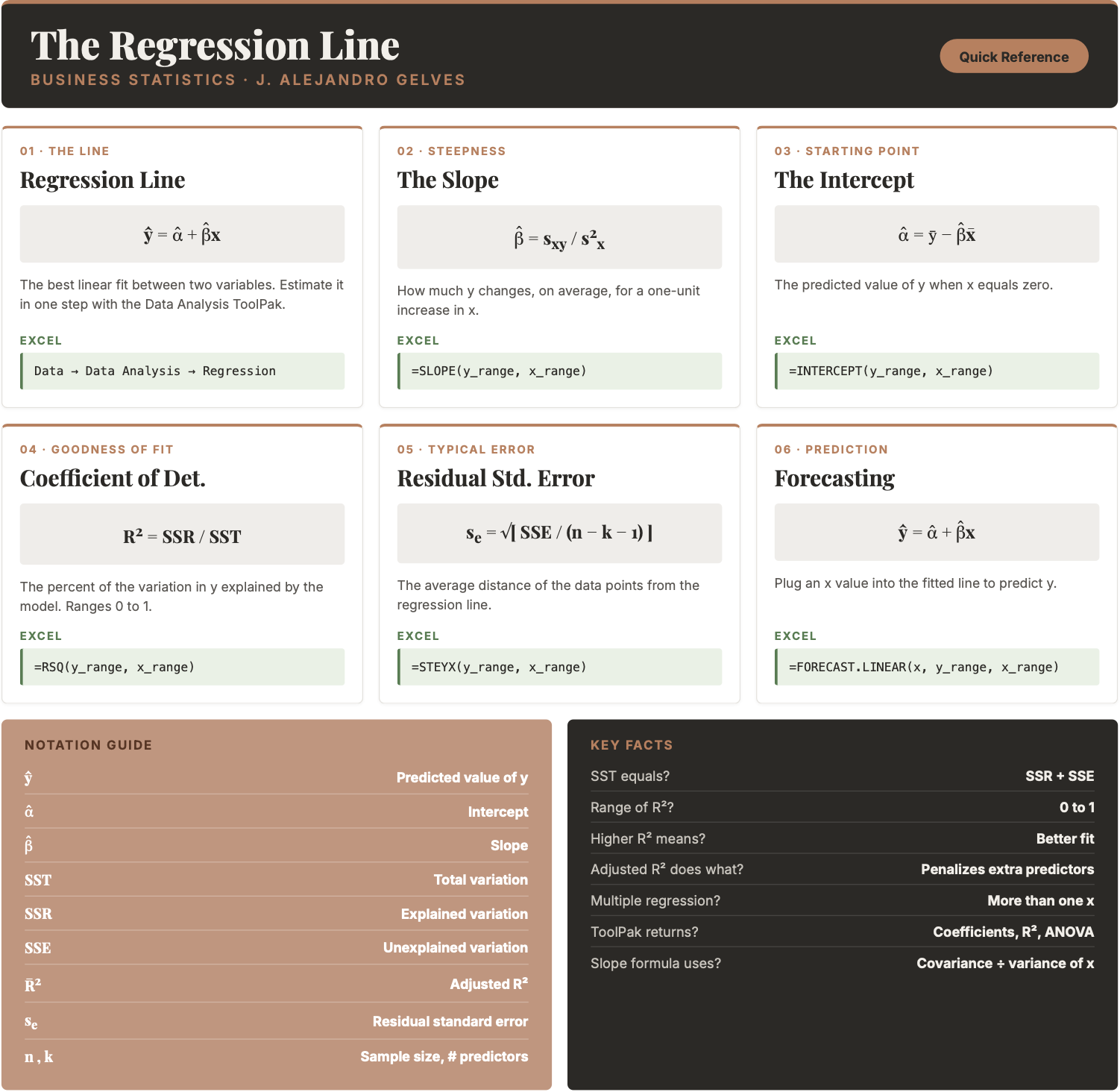
7.7 Chapter Summary Cheat Sheet
7.8 Exercises
The following exercises will help you get practice on Regression Line estimation and interpretation. In particular, the exercises work on:
- Estimating the slope and intercept.
- Calculating measures of goodness of fit.
- Prediction using the regression line.
Answers are provided below. Try not to peek until you have formulated your own answer and double checked your work for any mistakes.
Exercise 1
For the following exercises, make your calculations by hand and verify results using Excel functions when possible.
- Consider the data below. Calculate the deviations from the mean for each variable and use the results to estimate the regression line. Verify your result using Excel. On average, by how much does y increase per unit increase of x?
| x | 20 | 21 | 15 | 18 | 25 |
|---|---|---|---|---|---|
| y | 17 | 19 | 12 | 13 | 22 |
Answer
The regression line is \(\hat{y}=-4.93+1.09x\). For each unit increase in \(x\), \(y\) increases on average by \(1.09\).
Start with the deviations from the mean (\(\bar{x}=19.8\), \(\bar{y}=16.6\)):
| \(x_i\) | \(y_i\) | \(x_i-\bar{x}\) | \(y_i-\bar{y}\) | Product | \((x_i-\bar{x})^2\) |
|---|---|---|---|---|---|
| 20 | 17 | \(0.2\) | \(0.4\) | \(0.08\) | \(0.04\) |
| 21 | 19 | \(1.2\) | \(2.4\) | \(2.88\) | \(1.44\) |
| 15 | 12 | \(-4.8\) | \(-4.6\) | \(22.08\) | \(23.04\) |
| 18 | 13 | \(-1.8\) | \(-3.6\) | \(6.48\) | \(3.24\) |
| 25 | 22 | \(5.2\) | \(5.4\) | \(28.08\) | \(27.04\) |
\[\hat{\beta}=\frac{\sum(x_i-\bar{x})(y_i-\bar{y})}{\sum(x_i-\bar{x})^2}=\frac{59.6}{54.8}=1.09\]
\[\hat{\alpha}=\bar{y}-\hat{\beta}\bar{x}=16.6-1.09(19.8)=-4.93\]
To verify in Excel, enter x in column A and y in column B. A single LINEST returns both coefficients, with the intercept last:
=LINEST(B2:B6, A2:A6, TRUE, TRUE)=INDEX(LINEST(B2:B6,A2:A6,TRUE,TRUE),1,1)→ \(\hat{\beta}=1.09\)=INDEX(LINEST(B2:B6,A2:A6,TRUE,TRUE),1,2)→ \(\hat{\alpha}=-4.93\)
- Calculate SST, SSR, and SSE. What is the \(R^2\)? What is the Standard Error estimate? Is the regression line a good fit for the data?
Answer
SST is \(69.2\), SSR is \(64.82\) and SSE is \(4.38\) (note that \(SSR+SSE=SST\)). The \(R^2\) is \(\frac{SSR}{SST}=0.94\) and the Standard Error estimate is \(1.21\). Both indicate a great fit of the regression line to the data.
All four numbers come out of the same LINEST block, so spill it once with =LINEST(B2:B6, A2:A6, TRUE, TRUE) and read off:
=INDEX(LINEST(B2:B6,A2:A6,TRUE,TRUE),5,1)→ \(SSR = 64.82\)=INDEX(LINEST(B2:B6,A2:A6,TRUE,TRUE),5,2)→ \(SSE = 4.38\)=INDEX(LINEST(B2:B6,A2:A6,TRUE,TRUE),3,1)→ \(R^2 = 0.94\)=INDEX(LINEST(B2:B6,A2:A6,TRUE,TRUE),3,2)→ \(s_e = 1.21\)
Then \(SST = SSR + SSE = 69.2\), which =DEVSQ(B2:B6) confirms.
- Assume that x is observed to be 32. What is your prediction of y? How confident are you in this prediction?
Answer
If \(x=32\) then \(\hat{y}=-4.93+1.09(32)=29.87\). The regression is a good fit, so we can feel good about our prediction. However, we would be concerned about the small sample size of the data.
In Excel:
=TREND(B2:B6, A2:A6, 32)→ \(29.87\)
Exercise 2
You will need the Education data set to answer this question. You can download it here:
The data shows the years of education (Education) and the annual salary in thousands (Salary) for a sample of \(100\) people.
- Estimate the regression line using Excel. By how much does an extra year of education increase the annual salary on average? What is the salary of someone without any education?
Answer
An extra year of education increases the annual salary by about \(\$5,300\) (the slope). A person with no education would be expected to earn about \(\$17,258\) (the intercept).
In Excel, assuming Salary is in column B and Education is in column C:
=LINEST(B2:B101, C2:C101, TRUE, TRUE)=INDEX(LINEST(B2:B101,C2:C101,TRUE,TRUE),1,1)→ \(5.30\)=INDEX(LINEST(B2:B101,C2:C101,TRUE,TRUE),1,2)→ \(17.26\)
- Confirm that the regression line is a good fit for the data. What is the estimated salary of a person with \(16\) years of education?
Answer
The \(R^2\) is \(0.67\) and the standard error is about \(21\). The line is a moderately good fit. A person with \(16\) years of education is predicted to earn about \(\$102,000\).
In Excel:
=INDEX(LINEST(B2:B101,C2:C101,TRUE,TRUE),3,1)→ \(R^2 = 0.67\)=INDEX(LINEST(B2:B101,C2:C101,TRUE,TRUE),3,2)→ \(s_e = 21\)=TREND(B2:B101, C2:C101, 16)→ \(102.08\)
Exercise 3
You will need the FoodSpend data set to answer this question. You can download it here:
- Remove any observations with missing values. Create a dummy variable that is equal to \(1\) if an individual owns a home and \(0\) if the individual does not. Find the mean of your dummy variable. What proportion of the sample owns a home?
Answer
Approximately \(36\%\) of the sample owns a home (mean \(=0.3625\)).
In Excel, assuming OwnHome is in column A and Food is in column B, first delete any rows with missing values. Then add a helper column C with the dummy variable:
=IF(A2="Yes", 1, 0)Copy it down for all rows and take the average:
=AVERAGE(C2:C81)→ \(0.3625\)
You can also skip the helper column entirely — the same proportion is =AVERAGE(IF(A2:A81="Yes",1,0)).
- Run a regression with Food as the dependent variable and your dummy variable as the independent variable. What is the interpretation of the intercept and slope?
Answer
The intercept (\(\approx 6473\)) is the average food expenditure of individuals without homes. The slope (\(\approx -3418\)) is the difference in food expenditure between individuals who own a home and those who do not — home owners spend about \(\$3,418\) less on food than non-owners.
In Excel, with Food in column B and the dummy in column C:
=LINEST(B2:B81, C2:C81, TRUE, TRUE)=INDEX(LINEST(B2:B81,C2:C81,TRUE,TRUE),1,2)→ intercept \(= 6473\)=INDEX(LINEST(B2:B81,C2:C81,TRUE,TRUE),1,1)→ slope \(= -3418\)
Because a single dummy just splits the sample in two, the two predictions are the two group means:
=TREND(B2:B81, C2:C81, 0)→ \(6473\), the same as=AVERAGEIF(A2:A81,"No",B2:B81)=TREND(B2:B81, C2:C81, 1)→ \(3055\), the same as=AVERAGEIF(A2:A81,"Yes",B2:B81)
- Now run a regression with your dummy variable as the dependent variable and Food as the independent variable. What is the interpretation of the intercept and slope? Hint: you might want to plot the scatter diagram and the regression line.
Answer
The regression line is \(\widehat{dummy}=1.432-0.000204\,Food\). This is a linear probability model: it predicts the likelihood of owning a home from food expenditure. The slope tells us how that likelihood changes as food expenditure increases by one dollar — in general, the likelihood of owning a home decreases as food expenditure increases. The scatter plot shows that most home owners have food expenditures below \(\$6,000\), while non-owners are mostly above it.
In Excel, with the dummy in column C and Food in column B:
=INDEX(LINEST(C2:C81,B2:B81,TRUE,TRUE),1,2)→ intercept \(= 1.432\)=INDEX(LINEST(C2:C81,B2:B81,TRUE,TRUE),1,1)→ slope \(= -0.000204\)
For the scatter plot, select Food and the dummy variable, go to Insert → Charts → Scatter, and add a linear trend line by right-clicking a point and choosing Add Trendline → Linear.
Exercise 4
You will need the Population data set to answer this question. You can download it here:
- Run a regression of Population on Year for Japan. How well does the regression line fit the data?
Answer
With an \(R^2=0.81\), the model fits the data very well.
In Excel, first isolate Japan: select the data, go to Data → Filter, and filter Country.Name to Japan. Copy the \(62\) Japan rows to a new sheet. Assuming Year is in column C and Population is in column D:
=INDEX(LINEST(D2:D63,C2:C63,TRUE,TRUE),3,1)→ \(R^2 = 0.81\)
- Create a prediction for Japan’s population in 2030. What is your prediction?
Answer
The prediction for \(2030\) is about \(140\) million people (\(140{,}268{,}585\)).
In Excel:
=TREND(D2:D63, C2:C63, 2030)→ \(140{,}268{,}585\)
- Create a scatter diagram and include the regression line. How confident are you of your prediction after looking at the diagram?
Answer
After looking at the scatter plot, it seems unlikely that the population in Japan will hit \(140\) million. In the most recent years the population has been decreasing, so the straight-line trend overstates the future population — the prediction should be treated with caution.
In Excel, select the Year and Population columns for Japan, go to Insert → Charts → Scatter, and add a linear trend line by right-clicking a point and choosing Add Trendline → Linear.