6 Regression I
Measures of association are essential tools in business statistics for analyzing relationships between variables. They help determine whether changes in one variable are linked to changes in another, providing valuable insights into patterns and dependencies. Understanding these relationships is critical for making informed decisions. By quantifying the strength and direction of associations, businesses can better interpret data, optimize strategies, and drive meaningful outcomes. Below we study important measures of association. Association still belongs to the describe stage of learning from data — here we characterize how two variables move together — but it also points ahead to inference, where we will ask whether a relationship seen in a sample is real or merely a product of chance.
6.1 The Covariance
The covariance is a measure that determines the direction of the relationship between two variables. It is calculated by:
THE COVARIANCE \[s_{xy}=\frac{\sum(x_i-\bar{x})(y_i-\bar{y})}{n-1}\] where \(x_i\) and \(y_i\) are observations, \(\bar{x}\) and \(\bar{y}\) are the sample means, and \(n\) is the sample size.
| \(s_{xy} > 0\) | \(s_{xy} = 0\) | \(s_{xy} < 0\) |
|---|---|---|
| Direct relationship | No relationship | Inverse relationship |
Example: Let’s consider the following data that captures the price of stocks (SPY) and bonds (BND):
| Period | SPY | BND |
|---|---|---|
| 1 | 87 | 316 |
| 2 | 86 | 380 |
| 3 | 84 | 416 |
| 4 | 85 | 430 |
| 5 | 83 | 440 |
The idea behind calculating a covariance is to determine whether there is a relationship between the two variables. We start by finding the deviations from the mean for both SPY and BND:
| Period | SPY | BND | \(SPY - \bar{SPY}\) | \(BND - \bar{BND}\) | Product |
|---|---|---|---|---|---|
| 1 | 87 | 316 | \(2\) | \(-80\) | \(-160\) |
| 2 | 86 | 380 | \(1\) | \(-16\) | \(-16\) |
| 3 | 84 | 416 | \(-1\) | \(20\) | \(-20\) |
| 4 | 85 | 430 | \(0\) | \(34\) | \(0\) |
| 5 | 83 | 440 | \(-2\) | \(44\) | \(-88\) |
The covariance is the average of the products column using \(n-1\):
\[s_{xy} = \frac{-160 + (-16) + (-20) + 0 + (-88)}{5-1} = \frac{-284}{4} = -71\]
Since \(s_{xy} < 0\) there is an inverse relationship between SPY and BND. Intuitively, the covariance checks whether on average the products of the deviations from the mean is positive or negative. Whenever \(x\) lies below its mean and \(y\) lies above its mean, the product is negative — and vice versa — reflecting the inverse relationship between the two variables.
6.2 The Correlation
The correlation measures the strength of the linear relationship between two variables. It is calculated by:
THE CORRELATION COEFFICIENT \[r = \frac{s_{xy}}{s_x \cdot s_y}\] where \(s_{xy}\) is the covariance, \(s_x\) is the standard deviation of \(x\), and \(s_y\) is the standard deviation of \(y\).
The correlation coefficient lies between \([-1, 1]\):
| \(r = -1\) | \(-1 < r < 0\) | \(r = 0\) | \(0 < r < 1\) | \(r = 1\) |
|---|---|---|---|---|
| Perfect inverse | Inverse | No relationship | Direct | Perfect direct |
The strength of the relationship is determined by the absolute value of \(r\). Values close to \(1\) indicate a strong relationship, values close to \(0\) indicate a weak relationship.
Example: Consider the SPY and BND data. The standard deviation of SPY is \(s_{SPY} = 1.58\) and that of BND is \(s_{BND} = 50.37\). Substituting into the correlation formula:
\[r = \frac{-71}{1.58 \times 50.37} = -0.89\]
This indicates that the relationship between SPY and BND is inverse and strong.
6.3 The Coefficient of Determination (\(R^2\))
The coefficient of determination or \(R^2\) measures the percent of variation in \(y\) explained by variations in \(x\). It is calculated by:
THE COEFFICIENT OF DETERMINATION \[R^2 = r^2\] where \(r\) is the correlation coefficient. \(R^2\) ranges from \(0\) (no relationship) to \(1\) (perfect relationship).
Example: Consider once more the SPY and BND example. The correlation coefficient is \(r = -0.89\). Hence:
\[R^2 = (-0.89)^2 = 0.79\]
This indicates that about \(79\%\) of the variation in BND can be explained by changes in SPY. The two variables are closely related.
6.4 Measures of Association in Excel
Excel provides straightforward functions to calculate all three measures of association. Let’s use the SPY and BND data from the example above.
Covariance: To calculate the sample covariance use =COVARIANCE.S(). Assuming SPY is in column A and BND is in column B:
=COVARIANCE.S(A2:A6, B2:B6)Correlation: To calculate the correlation coefficient use =CORREL():
=CORREL(A2:A6, B2:B6)Coefficient of Determination: There is no direct Excel function for \(R^2\) between two variables. Simply square the correlation coefficient:
=CORREL(A2:A6, B2:B6)^2The results for the SPY and BND data are:
| Covariance | Correlation | \(R^2\) |
|---|---|---|
| \(-71.00\) | \(-0.8916\) | \(0.79\) |
Scatter Plot: To create a scatter plot in Excel, select both columns and go to Insert → Charts → Scatter. This will display the relationship between SPY and BND visually. To add a trend line, right-click any point in the scatter plot and select Add Trendline → Linear.
6.5 Excel Function Summary
Below is a list of the Excel functions used in this section:
=COVARIANCE.S(array1, array2)calculates the sample covariance between two variables. Use=COVARIANCE.P()for the population covariance.=CORREL(array1, array2)calculates the correlation coefficient between two variables. The result is always between \(-1\) and \(1\).=CORREL(array1, array2)^2calculates the coefficient of determination \(R^2\) by squaring the correlation coefficient. Excel does not have a standalone \(R^2\) function for two variables.
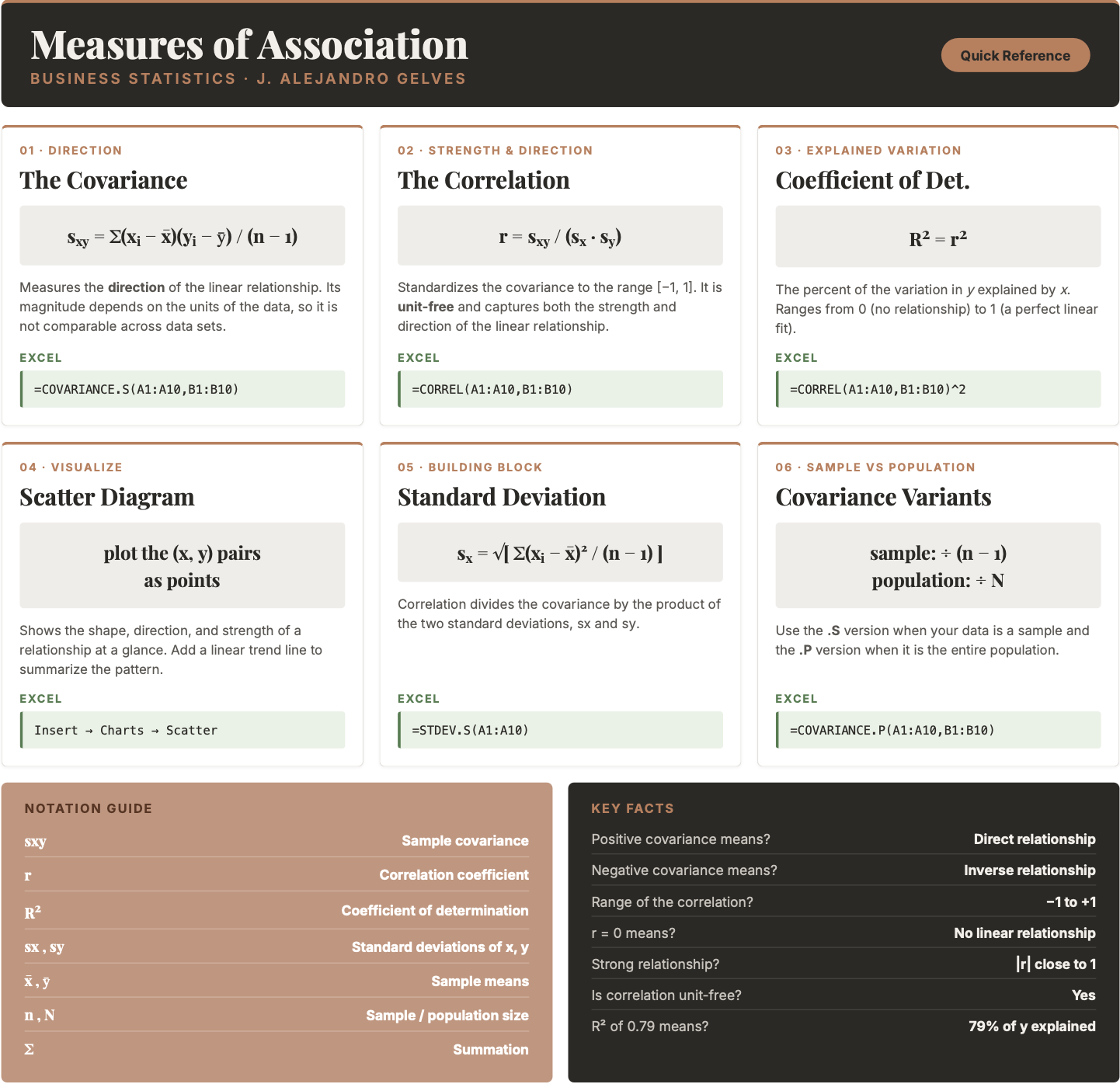
6.6 Chapter Summary Cheat Sheet
6.7 Exercises
The following exercises will help you understand statistical measures that establish the relationship between two variables. In particular, the exercises work on:
- Calculating covariance and correlation.
- Creating scatter diagrams in Excel.
- Calculating the coefficient of determination.
- Interpreting measures of association in a real-world context.
Answers are provided below. Try not to peek until you have formulated your own answer and double checked your work for any mistakes.
Exercise 1
For the following exercises, make your calculations by hand and verify results using Excel functions when possible.
- Consider the data below. Calculate the covariance and correlation coefficient by finding deviations from the mean. Verify your result using Excel. Is there a direct or inverse relationship between the two variables? How strong is the relationship?
| x | 20 | 21 | 15 | 18 | 25 |
|---|---|---|---|---|---|
| y | 17 | 19 | 12 | 13 | 22 |
Answer
The covariance is \(14.9\) and the correlation is \(0.96\). The results indicate that there is a strong direct relationship between the two variables.
Start by finding the mean of each variable: \(\bar{x} = 19.8\) and \(\bar{y} = 16.6\). Then build the deviations table:
| \(x_i\) | \(y_i\) | \(x_i-\bar{x}\) | \(y_i-\bar{y}\) | Product |
|---|---|---|---|---|
| 20 | 17 | \(0.2\) | \(0.4\) | \(0.08\) |
| 21 | 19 | \(1.2\) | \(2.4\) | \(2.88\) |
| 15 | 12 | \(-4.8\) | \(-4.6\) | \(22.08\) |
| 18 | 13 | \(-1.8\) | \(-3.6\) | \(6.48\) |
| 25 | 22 | \(5.2\) | \(5.4\) | \(28.08\) |
\[s_{xy} = \frac{0.08+2.88+22.08+6.48+28.08}{4} = \frac{59.6}{4} = 14.9\]
\[r = \frac{14.9}{sd(x) \times sd(y)} = \frac{14.9}{3.49 \times 4.34} = 0.96\]
To verify in Excel, enter x in column A and y in column B and use:
=COVARIANCE.S(A2:A6, B2:B6)→ \(14.9\)=CORREL(A2:A6, B2:B6)→ \(0.96\)
- Consider the data below. Calculate the covariance and correlation coefficient by finding deviations from the mean. Verify your result using Excel. Is there a direct or inverse relationship between the two variables? How strong is the relationship?
| w | 19 | 16 | 14 | 11 | 18 |
|---|---|---|---|---|---|
| z | 17 | 20 | 20 | 16 | 18 |
Answer
The covariance is \(0.85\) and the correlation is \(0.148\). The results indicate that there is a very weak direct relationship between the two variables. They might be unrelated.
To verify in Excel, enter w in column A and z in column B and use:
=COVARIANCE.S(A2:A6, B2:B6)→ \(0.85\)=CORREL(A2:A6, B2:B6)→ \(0.148\)
Exercise 2
You will need the mtcars data set to answer this question. You can download it here:
- Calculate the correlation coefficient between
hpandmpg. Explain the results. Specifically, the direction of the relationship and the strength given the context of the problem.
Answer
The correlation coefficient is \(-0.78\). This is indicative of a moderately strong inverse relationship between mpg and hp. As horsepower increases, fuel efficiency tends to decrease.
In Excel, assuming mpg is in column A and hp is in column B:
=CORREL(A2:A33, B2:B33)→ \(-0.78\)
- Create a scatter diagram of the two variables. Is the scatter diagram what you expected after you calculated the correlation coefficient?
Answer
The scatter diagram is downward sloping and most points are close to the trend line. It is what was expected from a correlation coefficient of \(-0.78\).
In Excel, select the hp and mpg columns and go to Insert → Charts → Scatter. To add the trend line, right-click any point and choose Add Trendline → Linear.
- Calculate the coefficient of determination. How close is it to one? What else could be explaining the variation in the
mpg? Let your dependent variable bempg.
Answer
The coefficient of determination is \(0.60\). This value is not very close to one. This is expected since miles per gallon can also vary because of the car’s weight and fuel efficiency. It makes sense that hp only explains \(60\%\) of the total variation.
In Excel, square the correlation coefficient:
=CORREL(A2:A33, B2:B33)^2→ \(0.60\)
Exercise 3
You will need the College data set to answer this question. You can download it here:
- Create a scatter diagram between
GRAD_DEBT_MDN(Median Debt) on the y-axis andMD_EARN_WNE_P10(Median Earnings) on the x-axis. What type of relationship do you observe between the variables?
Answer
It seems like there is a direct relationship between both variables. The more debt a graduate takes on, the higher the earnings tend to be.
In Excel, select the MD_EARN_WNE_P10 and GRAD_DEBT_MDN columns and go to Insert → Charts → Scatter. Add a linear trend line by right-clicking a point and choosing Add Trendline → Linear.
- Calculate the correlation coefficient and the coefficient of determination. According to the data, are higher debts correlated with higher earnings?
Answer
The correlation coefficient shows a moderate direct relationship between earnings and debt, \(r = 0.46\). The coefficient of determination indicates that only \(21\%\) of the variation in earnings can be explained by debt.
In Excel, assuming GRAD_DEBT_MDN is in column A and MD_EARN_WNE_P10 is in column B:
=CORREL(A2:A1000, B2:B1000)→ \(0.46\)=CORREL(A2:A1000, B2:B1000)^2→ \(0.21\)
Note: use =CORREL() rather than =COVARIANCE.S() when there are missing values, as CORREL handles them more gracefully in Excel.
Exercise 4
You will need the HomePrices data set to answer this question. You can download it here:
- Create a scatter diagram between
bedrooms(number of bedrooms) andPrice(home sale price). What type of relationship do you observe between the two variables? Does the direction make intuitive sense?
Answer
There is a direct relationship between bedrooms and price. As the number of bedrooms increases, sale prices tend to rise. This is intuitive since larger homes generally command higher market values.
In Excel, select the bedrooms and Price columns and go to Insert → Charts → Scatter. Add a linear trend line by right-clicking a point and choosing Add Trendline → Linear.
- Calculate the correlation coefficient between
bedroomsandPrice. Explain the direction and strength of the relationship in the context of the housing market.
Answer
The correlation coefficient is \(r = 0.92\), indicating a strong direct relationship between bedrooms and sale price. Larger homes tend to sell for higher prices, though many other factors (location, condition, amenities) also influence price, which prevents a perfect correlation.
In Excel, assuming bedrooms is in column A and Price is in column B:
=CORREL(A2:A348, B2:B348)→ \(0.92\)
- Calculate the coefficient of determination. What percentage of the variation in
Priceis explained bybedrooms? What other factors might account for the remaining variation?
Answer
The coefficient of determination is \(R^2 = 0.85\), so about \(85\%\) of the variation in home prices is explained by the number of bedrooms alone. The remaining variation is likely driven by factors such as location, number of bathrooms, lot size, school district quality, and the overall condition of the property.
In Excel, square the correlation coefficient:
=CORREL(A2:A348, B2:B348)^2→ \(0.85\)